 Zapthen
Zapthen · Mac
Select text, one click does the next thing
Zapthen is a Mac utility: select text in any app and one click translates, asks AI, searches, adds a to-do or saves to flomo. No account, no analytics.
- Selected text leaves your Mac only when you click an action that needs the network (Ask, search, save to flomo).
- No account, no analytics. It needs the Accessibility permission in System Settings to read the text you select.
- Price: Free for now
How it works
No need to open an app first, no copy and paste. Whatever comes after selecting text gets done right beside the selection.
- 1Select textDrag, double-click or triple-click in apps like Notes, Safari or Mail.
- 2Look at the barA small bar appears above the selection. The coral one is the action you are most likely to want.
- 3Click onceClick an icon and it is done. Click the "…" at the right end for every action, or press 1 to 9 to pick one.
What one click can do
The everyday actions are built in. You can add, hide and reorder them in Settings.
Translate
Words or whole paragraphs, other languages into Chinese and Chinese into English. It uses the translation built into your Mac and runs on the device, or you can switch to your own AI service.
Ask
Have an AI explain what the text is, then keep asking follow-ups. You add your own AI service in Settings.
Search
Google and Kagi, plus 46 ready-made search sites you can add (Baidu, Zhihu, Tianyancha, Taobao, Bilibili and more), or write your own.
To-do and calendar
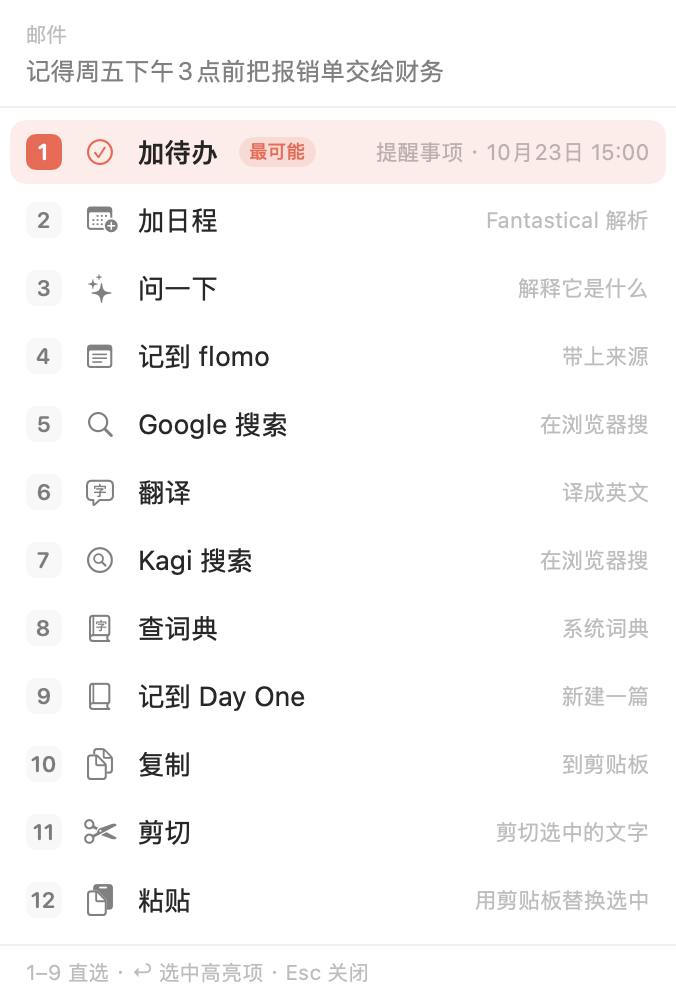
If the text contains a time such as "Friday 3pm", Add to-do uses it as the due time of a Reminders item. Add event hands the text to Fantastical.
flomo and Day One
Saves the text together with the app it came from, without switching windows.
Copy, cut, paste, dictionary
When you select text in an input field, cut, copy and paste come first. Dictionary uses the one built into macOS.
The most likely action comes first
The same gesture, different text, a different action in front.
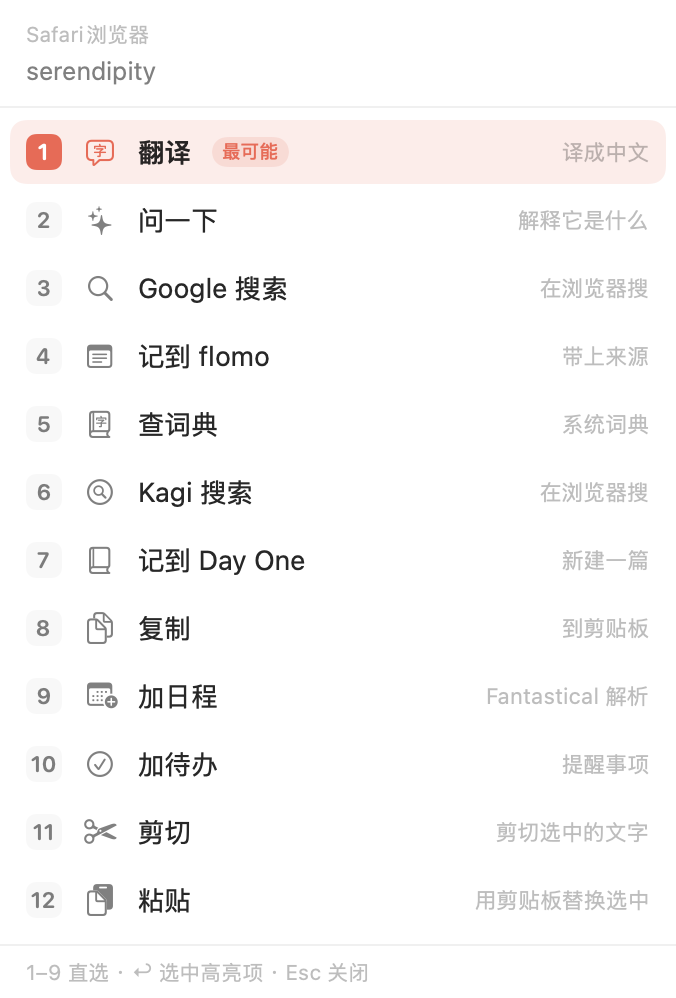
- Select an English word and Translate comes first.
- Select a sentence with a date and Add to-do comes first.
- Select a web address and Open link comes first.
- Select text in an input field and cut, copy, paste take the first three places.
The order looks at three things: what kind of text it is, which app you selected it in, and what you clicked before. If it guesses wrong, click something else and that click is remembered. Zapthen only sorts the actions. You do the clicking, and nothing runs on its own.
Set it up your way
In Settings you can drag actions into your own order, hide the ones you never use, and show 3 to 6 icons on the bar. For a fixed order, turn off smart ordering.
To keep the bar out of an app, add it to "Apps without the bar". To be left alone for a while, pause it for an hour from the menu bar.
The bar never takes keyboard focus and never presses shortcuts for you. It disappears when you click elsewhere, scroll, press any key or switch apps.
If a search site is not in the list, add it with a URL template, for example https://www.perplexity.ai/search?q={text}.
Where your selected text goes
Zapthen has no account, and the app contains no analytics or crash reporting. The text you selected, the app it came from and the action you clicked are recorded on this Mac only, to improve the ordering, and are never uploaded.
Text leaves your Mac only when you click an action that uses the network: Ask sends it to the AI service you entered, save to flomo sends it to your flomo address, and search opens a web address containing the text in your browser. The details are in the Privacy Policy.
FAQ
What is Zapthen?
A small Mac menu bar utility. Select text in any app and a small bar pops up beside the selection. One click translates, asks AI, searches, copies, adds an event or a to-do, or saves to flomo, with the most likely action first.
Is the text I select uploaded?
Only when you click an action that needs the network. Ask and translating with your own AI service send the text to the service you entered in Settings; save to flomo sends it to your flomo address; search opens a web address containing the text in your browser. System translation, copy, cut, paste and dictionary run on your Mac. Zapthen has no account and the app contains no analytics. The text you selected and the actions you clicked are recorded on this Mac to adjust the ordering and are never uploaded.
How much does it cost?
Free for now. Before it becomes paid, the website and the changelog will say so first.
Why does it need the Accessibility permission?
macOS requires it to read the text you select in other apps and to work out where the bar should appear. Zapthen only reads the text you select, never the contents of password fields, and does not simulate key presses or mouse clicks; actions such as cut and paste run through the matching item in the target app's Edit menu. On first launch a guide window shows you how: drag the icon in and turn the switch on.
In which apps does the bar appear?
In apps whose selection macOS Accessibility can read. Native apps such as Notes, Safari and Mail normally work. Terminal and some Electron-based apps may not expose the selection; press the shortcut Control-Option-N to bring up the actions, or turn on "Copy fallback" for that app in Settings.
Which AI does Ask use?
Your own. In Settings enter the address, model name and key of a service with an OpenAI-compatible interface (DeepSeek, Kimi, OpenAI and others work). The key is stored in the macOS Keychain. Without one, Ask is unavailable; translation, search and the other actions are not affected.
Which languages do the interface and translation support?
The interface comes in English, Simplified Chinese, Traditional Chinese, Japanese, Korean, German, French and Spanish and follows your system language; answers from Ask come back in that language too. Translation turns Chinese into English and other languages (including Japanese and Korean) into Simplified Chinese.
How do I report a problem?
Write to zapthen@zapthen.com with your macOS version, your Zapthen version and a short description of the problem.
Price and requirements
Free for now. Before it becomes paid, this page and the changelog will say so first. Requires macOS 26 or later, on Apple silicon and Intel; the interface comes in 8 languages and follows your system language.